Insights / Averane perspective
Your Next Website Visitor Might Be an AI Agent: How to Prepare Your Business Website
An attractive website earns attention. A useful website helps someone finish what they came to do. As AI assistants take on more of that work, the relationship between those two goals is becoming more important.
Consider a prospective customer who wants to find a service, compare options, and arrange an appointment. They may still visit your website themselves. They may also ask an assistant to help with parts of that journey. Either way, your website needs to communicate what you offer, what happens next, and whether an action actually succeeded.
For business owners, an AI-ready website is best understood as a site with clear information and dependable interactions, plus carefully chosen support for emerging agent tools where it makes sense. It is an ongoing design and development responsibility, rather than a badge a vendor can award once.
At Averane, our recommendation is to start with the customer journey. Identify where uncertainty or unnecessary effort stands between interest and a completed inquiry. Then decide whether conventional improvements, an experimental integration, or both would address the problem.
What is changing: WebMCP and websites that explain their actions
WebMCP is a proposed web standard that lets pages expose structured tools to AI agents. Google documents two approaches: annotations on HTML forms and tools defined with JavaScript. Its Chrome origin trial began with Chrome 149. As of September 10, 2026, this remains an evolving experiment, not a capability to assume across every browser or assistant. Read Google's WebMCP overview.
The practical idea is straightforward: a website can describe an available action and the information that action needs. The WebMCP explainer describes a sequence in which a page registers a tool, an agent discovers it, the browser mediates a call, and the page returns a result. Existing application logic can carry out the task and update the interface. See the WebMCP proposal.
For a business, the useful question is which customer task would benefit from that explicit interaction. A complicated service finder might be a candidate. A simple page with a phone number might already do its job well. Technology should earn its place through the problem it solves.
AI search visibility and AI website interaction are different jobs
There are two questions worth separating when planning your investment: can a potential customer discover your business, and can they complete a task once they arrive?
Google's current guidance says established SEO practices remain relevant to its generative search features because those features use its Search ranking and quality systems. It emphasizes useful content and a clear technical structure. It also says there is no special requirement to create an llms.txt file for Google Search, and no ideal article length for AI visibility. Read Google Search Central's guidance.
WebMCP addresses interaction with a page. Google's documentation notes that a client or browser must visit the site to discover its tools. It does not provide a basis for promising better rankings or inclusion in AI answers simply because a business adds WebMCP. WebMCP capabilities and limitations.
Treat those as separate workstreams. Your content plan should explain the business in useful detail. Your interaction plan should make tasks reliable. Success in one area does not automatically establish success in the other.
A practical example: booking a service appointment
Imagine a homeowner asking an assistant to help arrange an air-conditioning service visit. The following is an illustrative workflow, not a claim that every browser supports it today or a description of a live Averane client implementation.
First, the customer describes the need: routine maintenance, a preferred day, and a service location. The website must make its service area and appointment types clear enough to rule out unsuitable choices. If emergency repairs require a phone call, that distinction should appear before someone selects a routine maintenance slot.
Second, the website returns actual availability. The appointment system remains the source of truth. An assistant should not have to interpret an old promotional banner as evidence that a time is available. The response should distinguish an open appointment from a request that still requires staff approval.
Third, the customer reviews the details. That review should include the selected service, location, date, time zone, any stated fee, and the effect of pressing the final button. A request for a callback and a confirmed appointment are different commitments; the interface should make the distinction visible.
Fourth, the website records the action and returns a clear outcome. A confirmation should correspond to a record the business can find. If the slot disappears during the process, the site should explain what happened and offer another choice. If a connection fails, the interface should avoid encouraging duplicate submissions.
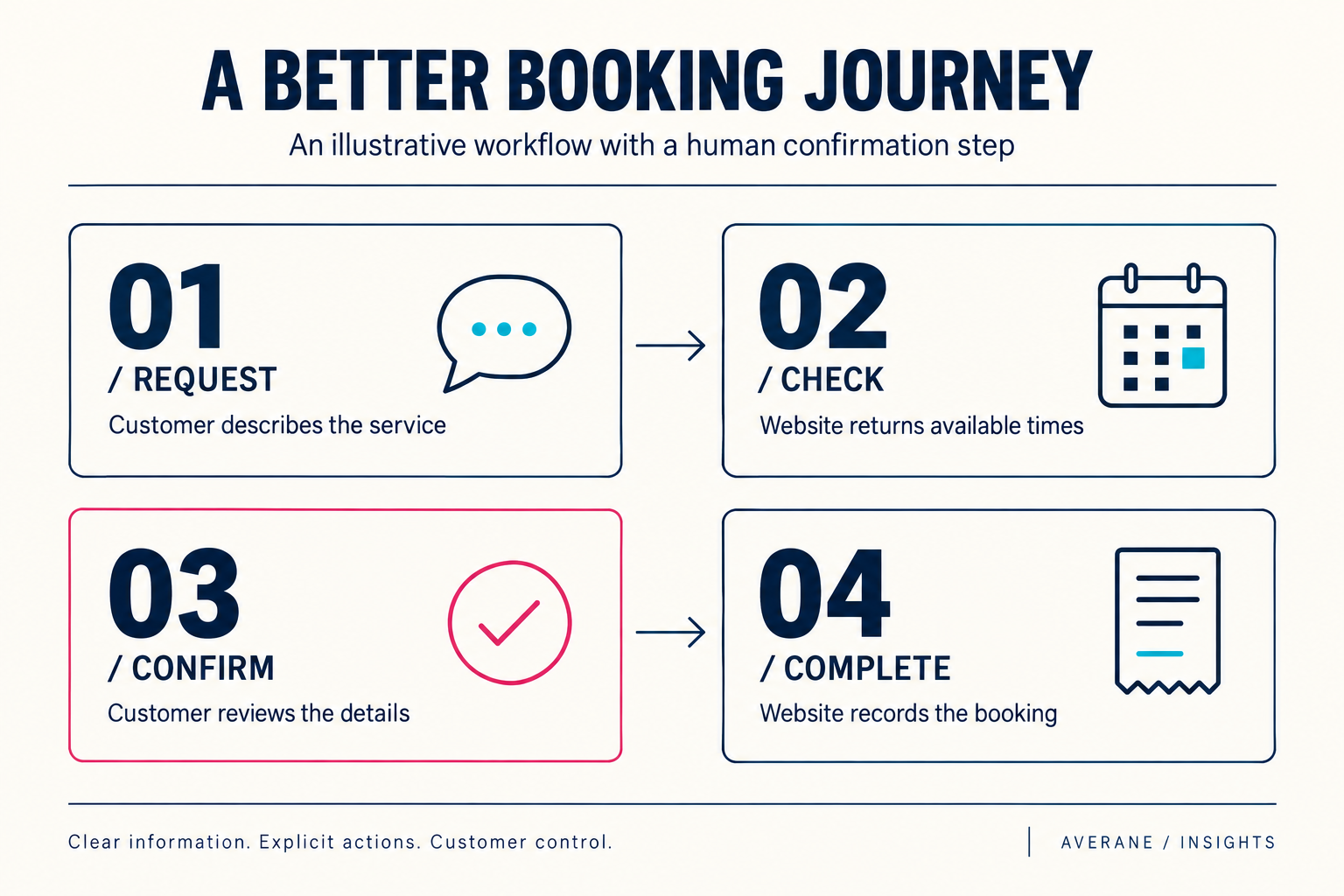
This example exposes a useful planning principle: the hard work is often defining the service and its business rules. A new interface cannot resolve contradictory prices, outdated availability, or an unclear distinction between an inquiry and an order.
Six areas to improve before adding an agent integration
1. Make service information specific enough to support a decision
Choose one revenue-generating service page and read it as a first-time buyer. Does it explain who the service is for, what is included, where it is available, and what happens after an inquiry? Does it distinguish optional extras from the standard scope?
For example, “comprehensive maintenance solutions” leaves important questions unanswered. A more useful description could identify the systems covered, the service area, the inspection process, and how estimates are approved. Where a fixed price is inappropriate, explain the factors that determine the quote. The goal is a more informed decision, not forcing every service into a shopping cart.
2. Give forms clear labels and predictable behavior
W3C's accessibility guidance recommends labels that identify the purpose of form controls and associate the label with the relevant field. That connection also helps assistive technology present the correct information. W3C guidance on labeling controls.
In practice, audit the forms that generate leads. Replace an ambiguous “Name” field when you actually need a company name. Explain why a phone number is required. Tell visitors how to correct an invalid entry. Keep instructions available while people type, and make the confirmation specific: “Your consultation request has been received” communicates more than “Success.”
3. Align the visible page with the underlying business rules
Create a short inventory of facts repeated across your website: service areas, opening hours, lead times, price ranges, cancellation terms, and contact details. Assign an owner to each fact and decide which system controls updates.
This is especially useful when marketing pages and booking software are maintained by different people. If the website advertises Friday appointments but the scheduler never offers them, the customer encounters a contradiction. A regular content review can uncover that mismatch before you build more automation around it.
4. Test complete journeys on ordinary devices
Test from the landing page through the final confirmation on a phone, with a keyboard, and under a less-than-perfect connection. Include errors and interruptions in the exercise. A polished first screen tells you very little about what happens after someone enters an invalid date or returns from a failed payment.
Document the observed problem, the step where it occurs, and the outcome you want. “Improve the website experience” is too broad to scope effectively. “Preserve the entered information when the form rejects a postcode” is a concrete improvement a team can implement and verify.
5. Make important actions explicit and recoverable
For your development brief, distinguish viewing information, preparing a request, and committing a change. Searching for appointments should not silently reserve one. Updating a delivery address should make the new address visible before it is used.
For actions that create records, ask how retries are handled, how staff investigate failures, and how customers correct mistakes. These are business requirements as much as technical ones. Write them down before deciding which interface will trigger the action.
6. Maintain a useful human route
Keep contact details and a normal route through important tasks easy to find. A customer might prefer to complete the form themselves or need help with an unusual requirement. An assistant may also encounter a question the site cannot answer.
Specify where the handoff goes, what information the customer should provide, and how your team responds. Avoid promising an immediate response unless the business can support it. A clear handoff is part of a complete service experience.
When a WebMCP pilot makes business sense
We recommend a limited pilot when a task is repeated often, has clear inputs and outcomes, and already works through the website. A read-only product filter or an appointment-availability lookup is easier to evaluate than a workflow that immediately charges a customer or changes an account.
Write the pilot brief around one task. Include the supported environment, the data source, the expected result, the fallback, and the person responsible for maintaining it. Also define what would justify keeping the integration: fewer failed attempts, less customer effort, or a measurable reduction in staff rework.
The current WebMCP proposal supports tool definitions with names, descriptions, input schemas, and execution logic. That gives a development team a way to describe the action precisely. It does not remove the need to define the business rules behind that action. WebMCP tool registration and lifecycle.
A brochure site with straightforward inquiries may get more value from better copy and forms first. A business with complex configuration or scheduling may have a stronger reason to experiment. Neither should approve an integration simply to claim it has “AI.”
Customer control belongs in the design brief
Google's WebMCP security guidance, updated September 1, 2026, highlights prompt-injection risks and recommends hints for read-only tools, untrusted content, and consequential actions. It also advises carefully controlling which origins can access tools. These are preliminary safeguards within an evolving design, rather than a guarantee that an agent will always behave safely. Read the WebMCP tool security guidance.
For a business owner, turn that into a concrete review conversation: which actions can reveal customer information, which can change a record, and which require the customer to review a commitment? Ask the developer to demonstrate those boundaries with realistic failure cases.
Our recommended acceptance criteria include enforcing authorization in the application, validating submitted values, checking current availability at the point of commitment, and recording enough information to investigate failures without collecting unnecessary personal data. The system should enforce these requirements even when a request arrives through an unexpected sequence of steps.
A 30-day plan for preparing your website
Week 1: Map one valuable customer journey
Select a task tied to a business outcome, such as a qualified consultation request. Record every step from the service page to the confirmation. Ask a colleague unfamiliar with the process to try it and note where they hesitate. Review recurring questions your team receives. Deliverable: a short list of obstacles supported by observed examples.
Week 2: Fix information and form problems
Clarify service scope, correct conflicting details, improve field labels, and rewrite confusing error messages. Connect related pages with descriptive links. Check that the final confirmation accurately describes the next step. Deliverable: an improved conventional journey that customers can use immediately.
Week 3: Scope one optional experiment
If a recurring task warrants it, ask your developer to assess a WebMCP pilot in a supported test environment. Document the tool's purpose, permitted inputs, output, failure behavior, and maintenance owner. Include a decision to defer if the platform or business case is unsuitable. Deliverable: a bounded experiment with a clear go/no-go decision.
Week 4: Evaluate outcomes and set a review date
Compare the revised journey with your starting observations. Run the same test scenarios, including invalid information and unavailable options. Record what improved and what remains unresolved. If the pilot proceeds, schedule a review as browser support and the proposal evolve. Deliverable: a prioritized next step backed by evidence.
Measure completed work, not a new technology label
Build a small scorecard around the selected task. Track the proportion of attempts that reach a valid result, the time taken, the number of corrections, and whether the customer needs help. For a service business, also review whether inquiries are complete enough for staff to act on and whether they fit the service offered.
Compare like with like. If you simplify the form and introduce an agent integration at the same time, an improvement cannot automatically be credited to the integration. Record the changes and, where practical, test them separately. With low traffic, be candid about small samples and use observed task failures to guide the next iteration.
Be equally careful about attribution. Analytics may not reliably identify every assistant-mediated visit. Avoid labeling all unexplained traffic as AI. You can still measure whether the website's tasks work, whether records are correct, and whether customers receive the outcome they expected.
Questions business owners are asking
Do we need to rebuild our website for AI agents?
Start with an audit of the customer journey and the limitations of your current platform. A rebuild should follow from identified needs, such as an unmaintainable booking process or persistent accessibility barriers. The existence of a new browser experiment alone is a weak business case for replacing a working website.
Will an AI-ready website rank higher?
Do not treat that label as a ranking promise. Google continues to emphasize established SEO fundamentals for its AI search features. Judge a proposal by the concrete work included and the outcomes it can reasonably measure. Google's AI search optimization guide.
Should every task become an agent tool?
Our recommendation is to prioritize a small number of useful, well-defined actions. A long list of capabilities creates more work to document, test, and maintain. Begin with the customer problem that has the clearest value and expand only when the results justify it.
What should we ask our web agency first?
Ask them to demonstrate one complete customer journey, show where it fails, and explain the proposed improvement. Request a clear distinction between work that benefits all visitors today and any experimental integration. A credible brief should also identify the ongoing owner, maintenance cost, and evidence that will determine success.
Build a website that is easier to understand and use
The strongest preparation begins with the fundamentals your customers already depend on: specific information, reliable forms, clear decisions, and accurate outcomes. Those improvements have value while the agent ecosystem continues to develop.
Averane brings web design, development, digital marketing, and ongoing website support together. For a business considering its next move, we recommend starting with a focused assessment of the journey that matters most, then building a plan around the findings.
Explore our web design services, learn about our digital marketing approach, or schedule a conversation with Averane about preparing your website for what comes next.
Technology status checked September 10, 2026. The planning recommendations and illustrative workflow above are Averane's editorial guidance; they are not results from a customer case study or a promise of browser support, rankings, or conversion gains.